Hypic vs Photoshop: Which One is Best for Basic Edits?
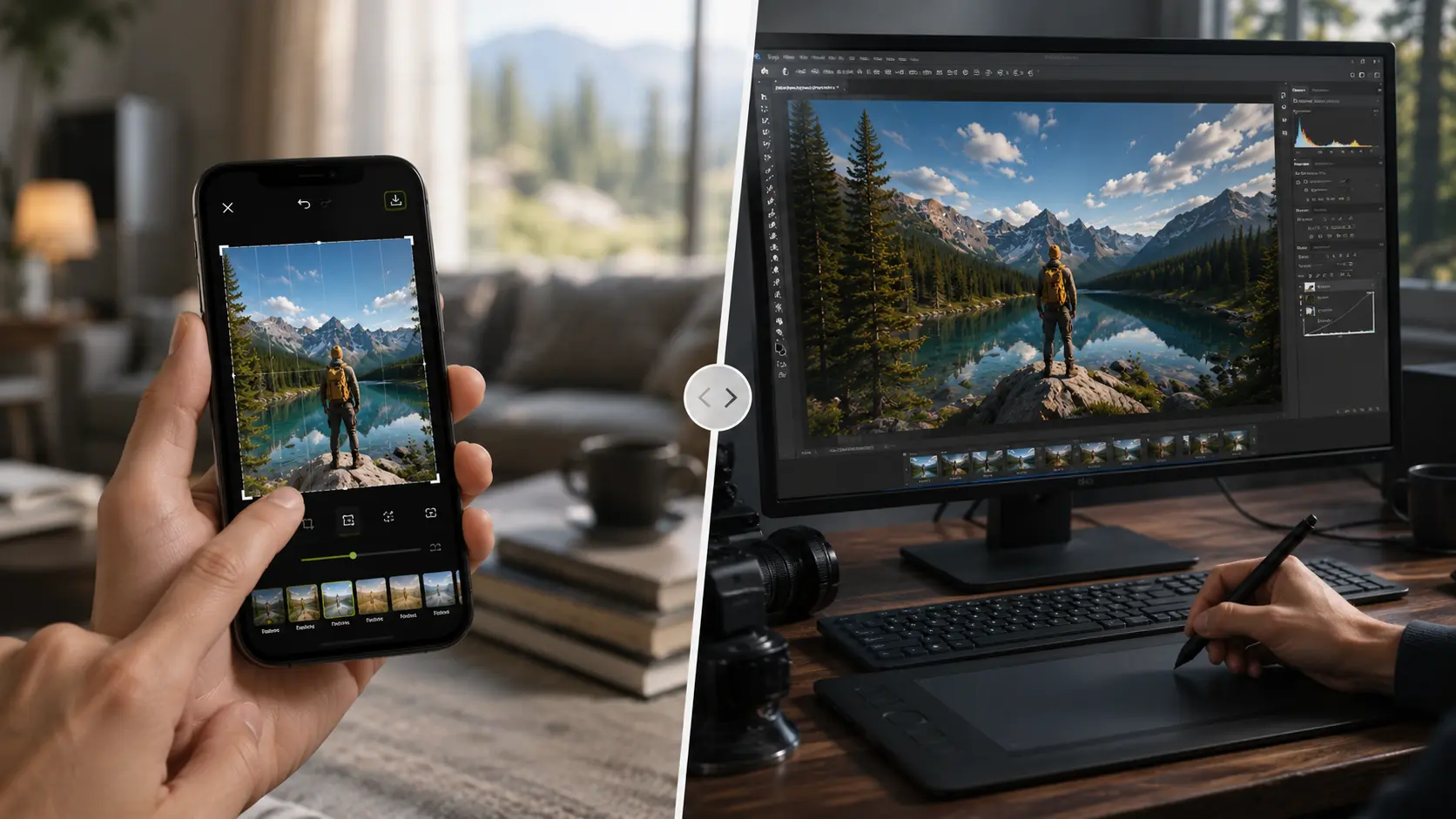
Most people don’t need Photoshop anymore just to brighten a selfie, remove a messy background, or apply quick retouching. That’s exactly why AI-powered editors like Hypic are growing so quickly. While Photoshop still dominates professional editing, Hypic focuses on fast mobile editing, beginner-friendly tools, and one-tap AI enhancements. So when users compare Hypic vs Photoshop for basic edits, they’re really trying to figure out which app delivers better everyday editing without unnecessary complexity.
Why the Comparison Between Hypic and Photoshop Matters
Adobe Photoshop has been the industry standard for years, trusted by photographers, designers, and professional editors who need full control over every detail. Hypic takes a very different approach. It focuses on mobile-first editing, AI automation, and quick results that work well for social media users and casual creators.
For simple edits like:
- skin retouching
- lighting fixes
- filters
- background cleanup
- social-ready photos
opening a heavy desktop program can sometimes feel unnecessary. On the other hand, users who care about precision and advanced editing flexibility may still prefer Photoshop’s deeper toolkit.
The better choice ultimately depends on:
- your workflow
- editing style
- device preference
- how much manual control you need over the final image.
Understanding Hypic: Mobile Editing Built Around Speed
Why Hypic Became Popular So Quickly
Hypic wasn’t designed for traditional photo editors. It was built for people who want fast results without learning complicated tools.
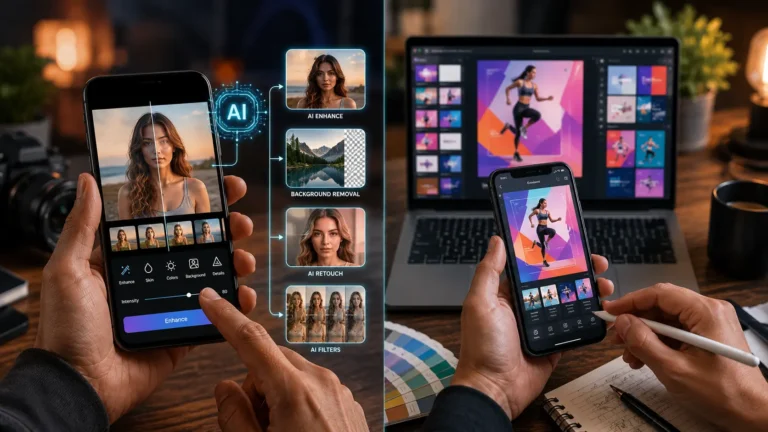
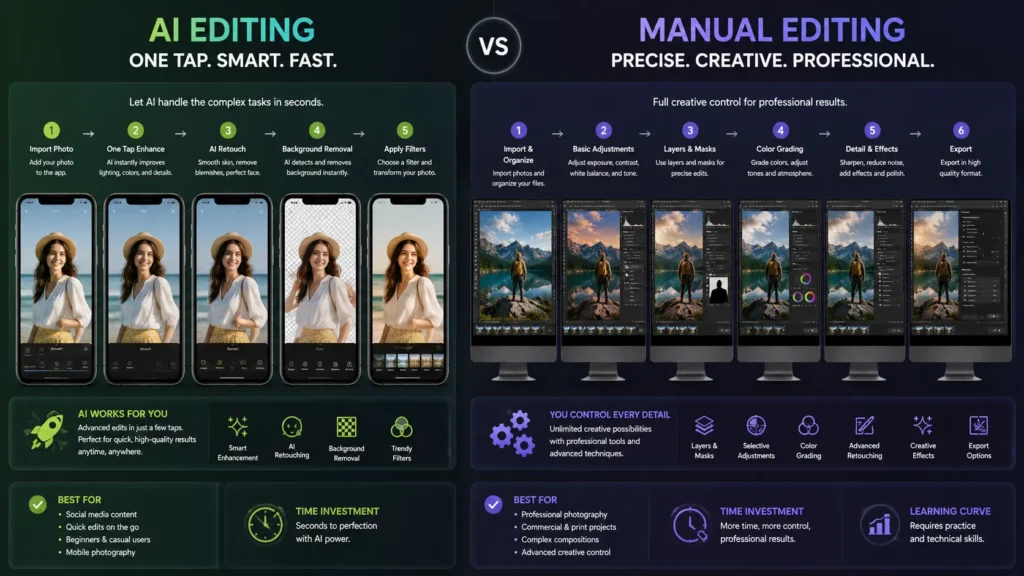
The app is heavily focused on mobile-first editing. Everything feels simplified: sliders instead of technical panels, AI adjustments instead of manual masking, one-tap enhancements instead of layered workflows.
That simplicity is a huge reason behind its growth.
You open a photo, apply changes, export it, and move on. There’s very little friction in the process, which makes the app appealing for casual creators, influencers, and beginners who mainly edit content for Instagram, TikTok, or personal use.
Instead of teaching users how to edit manually, Hypic tries to automate most of the work in the background.
Features That Make Hypic Good for Basic Edits
Hypic performs best when the goal is quick visual improvement rather than deep technical editing.
Some of its most useful tools include:
AI Retouching and Face Enhancement
This is one of the app’s biggest selling points.
Hypic automatically detects facial features and applies adjustments like:
- Skin smoothing
- Blemish cleanup
- Brightness balancing
- Teeth whitening
- Facial reshaping
For someone with zero editing experience, the process feels almost instant. You don’t need to zoom in and manually retouch every area the way you would in Photoshop.
That convenience alone makes it attractive for users looking for easy image retouching software.
Automated Background Removal
Background removal used to be frustrating, especially for beginners. In Photoshop, isolating a subject often meant using selection tools, masks, and manual cleanup just to get usable edges.
Hypic simplifies the process dramatically.
In many cases, the app can remove a background with a single tap. It works especially well for portraits, selfies, and product shots with clear subject separation.
It’s not always perfect, but for fast social content, the results are surprisingly usable.
Filters and Aesthetic Presets
Hypic leans heavily into modern social-media editing styles.
You’ll find:
- Cinematic filters
- Soft portrait effects
- Vintage-style presets
- AI-enhanced lighting
- Trend-based color grading
The app clearly prioritizes visual style and speed over technical editing depth.
Where Hypic Starts Feeling Limited
The same simplicity that makes Hypic convenient can also become its biggest limitation.
Once edits get more complicated, the app starts showing its boundaries.
There’s limited support for:
- Advanced layer editing
- Precise masking
- Detailed compositing
- Professional color correction
- Pixel-level precision adjustments
AI editing also has a habit of making assumptions. Sometimes those assumptions work well. Other times, they create strange edges, unnatural smoothing, or inconsistent lighting corrections.
That’s usually where Photoshop pulls ahead.
Understanding Adobe Photoshop
Why Photoshop Still Matters
Even with the rise of AI editors, Photoshop still dominates professional image editing for one reason: control.
Where Hypic tries to simplify editing, Photoshop gives users access to almost everything. Every adjustment can be refined manually, often down to individual pixels.
That level of precision is why photographers, commercial designers, agencies, and retouchers continue using it despite the learning curve.
Photoshop isn’t really built around speed. It’s built around control, which is why professional editors still rely on it for client work, print projects, and complex retouching.
Photoshop Basic Editing Tools
Even though Photoshop is often associated with advanced editing, its core adjustment tools are still some of the best available.
Non-Destructive Editing Workflow
One of Photoshop’s biggest strengths is its non-destructive layer workflow.
Users can make changes through:
- Adjustment layers
- Smart objects
- Layer masks
- Camera Raw filters
Without permanently damaging the original image.
That flexibility becomes extremely valuable for professional or client work because edits remain editable later.
Precision Adjustments
Photoshop offers much more control over:
- Exposure
- Color grading
- Curves
- White balance
- Contrast
- Shadows and highlights
For photographers or editors who care about consistency, this level of control makes a noticeable difference.
Cleanup and Retouching Tools
Photoshop’s healing tools are still stronger than most mobile AI editors, especially for difficult edits.
Features like:
- Healing Brush
- Clone Stamp
- Content-Aware Fill
- Patch Tool
allow for cleaner and more realistic retouching when images become complicated.
Why Casual Users Often Avoid Photoshop
Photoshop is powerful, but it can also feel excessive for everyday editing.
For beginners, the interface alone can be intimidating. There are panels, menus, layers, masks, and settings everywhere. Even simple edits can feel slower than they should.
There’s also the cost factor.
Unlike many mobile editors, Photoshop requires a recurring Creative Cloud subscription, and the software runs best on reasonably powerful hardware.
For someone who mostly edits selfies, thumbnails, or social posts, that investment may not feel worth it.
Hypic vs Photoshop for Basic Edits: Real-World Comparison
1. Which App Is Easier to Learn?
Hypic wins here without much debate.
The app is designed for beginners. Most tools are visual, automated, and easy to understand within minutes.
Photoshop takes more patience. Even basic actions like cropping, masking, or exporting can feel technical at first if you’ve never used editing software before.
That’s why many people asking “Is Hypic better than Photoshop for beginners?” usually end up preferring Hypic for casual editing.
Especially if:
- You mainly edit on your phone
- You create social content
- You want fast results
- You don’t need advanced design tools
2. Which One Is Faster for Everyday Editing?
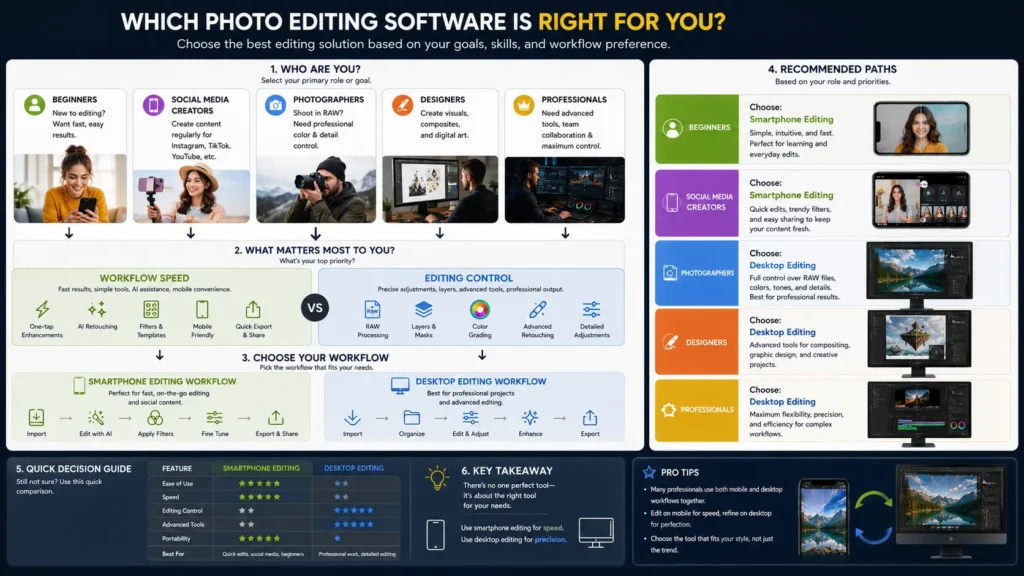
After testing both apps for quick social media edits, the biggest difference wasn’t image quality; it was workflow speed. Hypic lets you open a photo, apply AI adjustments, and export in seconds without leaving your phone.
You open the app, select a photo, apply adjustments, and export. The entire process can take less than a minute.
Photoshop introduces more setup time:
- Opening the desktop app
- Importing files
- Managing layers
- Exporting manually
That extra flexibility is useful for serious projects, but it slows down small edits.
For real-time content creation, especially on platforms like Instagram or TikTok, mobile editing simply fits modern workflows better.
3. AI Convenience vs Manual Precision
This is probably the biggest difference between the two.
Hypic relies heavily on automation. Photoshop relies on manual control.
Hypic works well when:
- Subjects are clear
- Lighting is predictable
- Edits are simple
- Speed matters most
Photoshop performs better when:
- Images are complex
- Edges need clean masking
- Colors need accurate correction
- Retouching must look natural
- High-resolution output matters
AI editing can look impressive quickly, but manual editing still produces better results when precision becomes important.
In everyday use, most casual users won’t notice the difference between AI editing and manual retouching until they start working with more complex images or professional-quality exports.
4. Mobile Freedom vs Long-Term Flexibility
Hypic fits people who edit directly from a phone and want quick results anywhere.
That makes it ideal for:
- Casual creators
- Students
- Influencers
- Travelers
- Everyday social users
Photoshop is better suited for long-term creative growth.
If you eventually want to work on:
- Commercial design
- Professional photography
- Client projects
- Print graphics
- Advanced composites
Photoshop offers far more room to grow.
Quick Comparison Table
|
Feature |
Hypic |
Adobe Photoshop |
|---|---|---|
|
Primary Platform |
iOS / Android |
Windows / macOS / iPad |
|
Editing Style |
AI-driven automation |
Manual precision editing |
|
Learning Curve |
Very easy |
Moderate to difficult |
|
Workflow Speed |
Extremely fast |
Slower but more flexible |
|
Best For |
Social content and quick edits |
Professional editing and design |
|
Background Removal |
Automated AI |
AI + manual masking |
|
Layer Support |
Limited |
Advanced |
|
Pricing |
Free with premium features |
Monthly subscription |
|
Ideal User |
Beginners and casual creators |
Designers and professionals |
Practical Tips for Better Results
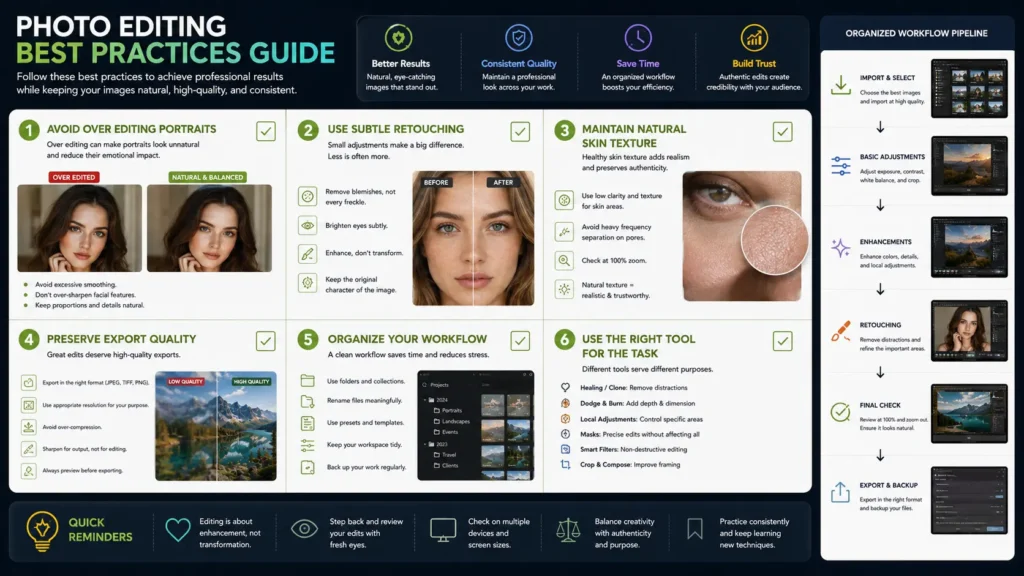
Getting More Natural Results in Hypic
One of the easiest mistakes in AI photo editing is overdoing everything.
Too much:
- Skin smoothing
- Face reshaping
- Sharpness
- Brightness enhancement
can make photos look artificial very quickly.
In most cases, lighter adjustments actually look better. Reducing AI slider intensity slightly usually produces more realistic results.
Speeding Up Photoshop for Basic Tasks
If you mainly use Photoshop for quick edits, simplifying the workspace helps a lot.
A few useful habits:
- Hide unnecessary panels
- Use Camera Raw for fast corrections
- Learn basic shortcuts
- Save export presets
- Create a cleaner workspace layout
Small workflow improvements make Photoshop feel much less overwhelming.
Hypic for Mobile Users: Better Than Photoshop Mobile?
For mobile-only users, Hypic often feels easier and faster than Photoshop Express or other Adobe mobile apps.
That difference becomes obvious when editing on the go. For quick Instagram posts or TikTok thumbnails, most users care more about finishing edits quickly than having dozens of advanced adjustment panels.
Adobe’s mobile ecosystem still carries some of the complexity of desktop editing. Hypic feels more streamlined and automation-focused.
That makes a noticeable difference for quick edits.
Chart: Mobile App Comparison
|
Mobile Feature |
Hypic |
Photoshop Express |
|---|---|---|
|
AI Retouching |
Strong |
Moderate |
|
Beginner Friendliness |
Very high |
Medium |
|
Workflow Speed |
Extremely fast |
Fast |
|
Layer Support |
Limited |
Limited |
|
Social Media Filters |
Extensive |
Moderate |
|
Manual Control |
Basic |
Better precision |
|
Device Performance |
Lightweight |
Heavier on older devices |
If your priority is mobile convenience and fast editing, Hypic honestly feels more optimized for modern social workflows.
Should You Switch From Photoshop to Hypic?
For basic edits, many users probably can.
Especially if your editing mostly includes:
- Selfies
- Instagram content
- TikTok thumbnails
- Quick touch-ups
- Mobile photography
- Casual content creation
For creators posting daily content, that speed matters more than having advanced layer tools sitting unused in a desktop workspace.
That said, Photoshop still becomes important once editing moves beyond simple adjustments. Professional photographers, designers, agencies, and advanced retouchers still need the precision and flexibility that desktop editing provides.
In reality, a lot of creators end up using both.
Hypic for quick mobile edits. Photoshop for serious projects.
That combination honestly makes more sense than treating them as direct replacements.
Common Editing Mistakes to Avoid
Over-Editing Portraits
AI apps make retouching incredibly easy, which is exactly why people often push edits too far.
Excessive smoothing and reshaping can remove natural texture and create that overly processed “plastic skin” look that’s common across social media.
Subtle edits almost always age better visually.
Using Photoshop for Tiny Edits
A lot of users automatically open Photoshop for edits that could be done on mobile in seconds.
For:
- Cropping
- Brightness fixes
- Quick cleanup
- Social uploads
lighter apps are usually more efficient.
Photoshop becomes worthwhile when detailed control actually matters.
Ignoring Export Quality
Many mobile apps compress exported images automatically.
That can reduce:
- Sharpness
- Detail retention
- Color quality
If you plan to print images or use them professionally, always keep original files backed up before applying mobile AI edits.
Final Verdict
The better app really depends on what kind of editing you actually do.
If your priority is speed, convenience, and mobile-friendly editing, Hypic makes a lot of sense. It’s fast, beginner-friendly, and surprisingly capable for everyday social content.
Photoshop still wins when editing precision, flexibility, and long-term creative control matter more than convenience.
For casual users and mobile creators, Hypic will realistically handle most everyday editing without the complexity that comes with Photoshop.
For professionals, Photoshop remains hard to replace.